Approvals
Approval, when central control matters
Approval is optional and switched on in one place. New and changed bookings then wait for the booking office - already holding their room - until it confirms or refuses them.
Tick, decide, done
The list holds exactly the bookings that wait for a decision, earliest date first, with when, what, rooms and people, and who booked it. Tick them - or all of them at once - and decide.
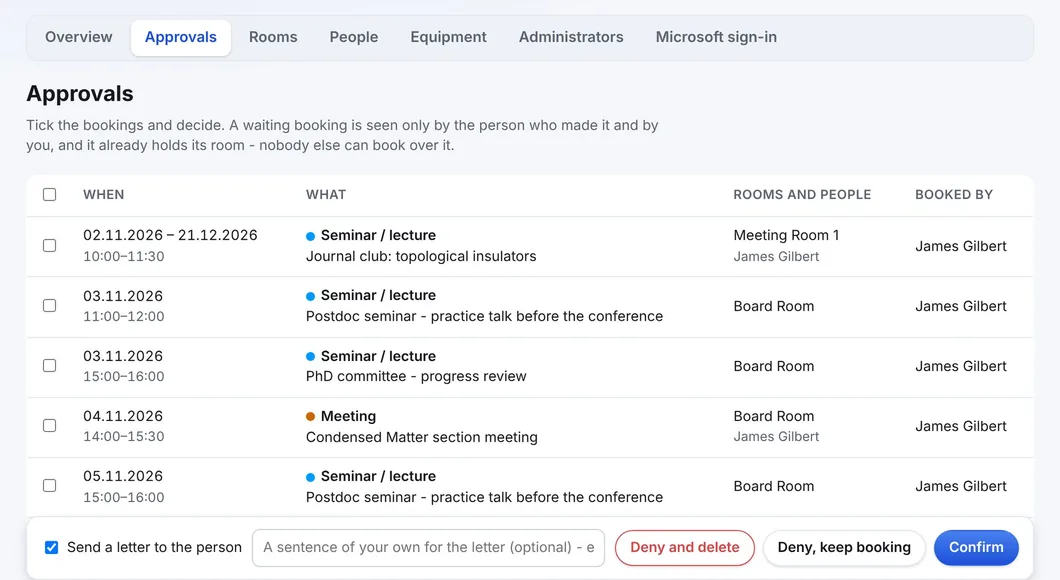
Three decisions
| Button | What happens |
|---|---|
| Confirm | The bookings are accepted and appear everywhere at once. |
| Deny, keep booking | The person is told no, but the booking stays, holding the room while somebody sorts it out. |
| Deny and delete | Refused and removed. WBS asks first; this cannot be undone. |
One letter per person
Send a letter to the person (on by default) tells each owner what was decided - one letter per person, however many of their bookings were in the batch. A sentence of your own can be added: the hall is being repainted that week turns a refusal into an answer. Untick it when clearing an old backlog.
- A waiting booking is seen only by its owner and the administrators
- It already holds its room, so nobody else can book the same hour while it waits
- A changed booking waits again; the room stays held
- A trusted person's bookings can skip the queue
See WBS with your own rooms
Book an online presentation. We set up your rooms and your booking rules, and a new institution is usually live within a few days.