Reports
Reports that answer the question
Four reports, all about bookings and rooms - on screen, in Excel, as a PDF, printed, or as a calendar.
Room utilisation
Rooms against days (or weeks, over a longer range), shaded by load, with totals and percentages - unused rooms included, because which rooms are we not using is the question.
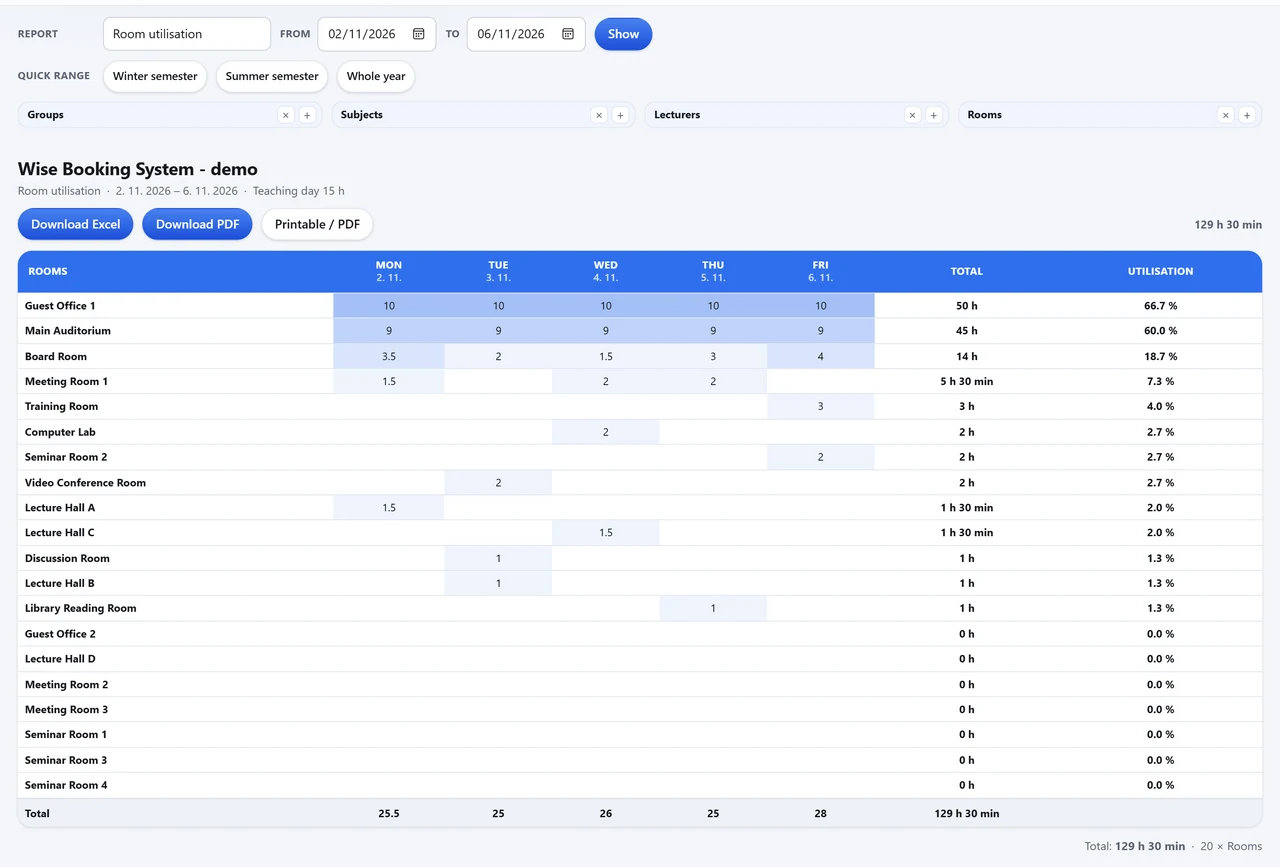
The four reports
| Report | What it shows |
|---|---|
| Room utilisation | Rooms against days or weeks, with hours, totals and percentages. |
| By date | Every booking, day by day; a tick repeats every value on every row for a spreadsheet. |
| Consolidated view | The chosen rooms side by side for each day, as one grid to print. |
| Week by week | One page per week, the way a week planner on a wall reads. |
Out of WBS, in every form
- Download Excel, Download PDF and Printable view under every report
- Add to calendar - subscribe, or download an .ics - where the report is a list of bookings
- Printed with the institution's own letterhead
- Whether visitors may open reports at all is a setting
See WBS with your own rooms
Book an online presentation. We set up your rooms and your booking rules, and a new institution is usually live within a few days.