wiseed

Student services

Student portal

“My study” is the student’s home in Wise Ed, made for a phone. It answers “is there anything I have to do?” first, then “how far am I?”, then everything else — each part shown only where the school has the module behind it.
  • What is next, before anything else
  • The same sign-in as the timetable’s student pages
  • The student sees only themselves

What it does

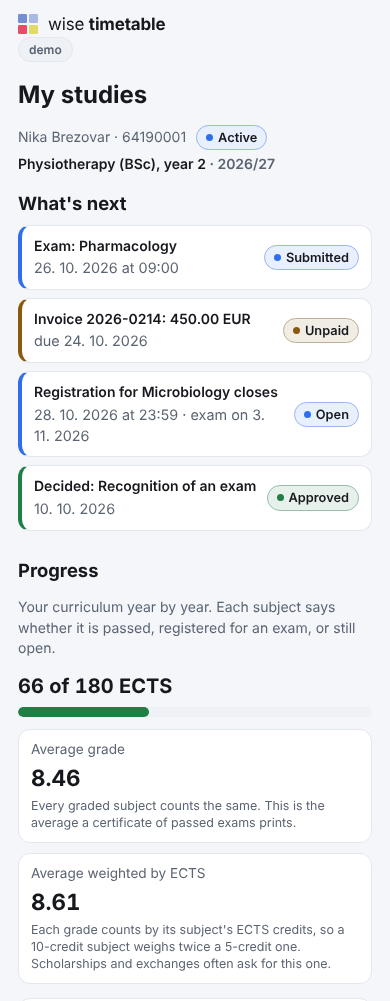
  • What is next, first: an exam the student is registered for, a registration about to close, an invoice falling due, a decision that came back, a thesis topic whose approval runs out.
  • Progress against the curriculum, not a list of grades: the credits so far and both averages, and “My progress” with the degree audit — what is satisfied and what is still needed.
  • Enrolment and documents: the online enrolment form, and the certificates to download.
  • Invoices and payments, each with a payment QR code to pay from, through finance.
  • Requests and the thesis, each with its status in the student office’s own words, and the thesis step by step.
  • Messages: conversations with the student office, a department or a lecturer, announcements and alerts — and the student’s own choice of what they are told, how, and when not.
The student portal on a phone: what is next, with an exam, an invoice, a registration closing and a decision, then the progress in ECTS and the two averages
“My study” on a phone: what is next first, then progress against the curriculum.

Everything else, one tap away

Assessment

The published assessment schemes of the student’s subjects, and their own points.

Course materials

Each subject’s files and links, with what is new since the last visit.

My adjustments

The accommodations in force, with their decision, and “Ask for renewal”.

My student file

Special statuses and their rights, decisions that concern the student, discounts and payouts.

Who sees my data

Parents, payers and sponsors, a switch per part for each, and who looked at what.

Alumni

After graduation: contact details, the alumni directory, connections and events.

Sign-in and privacy

  • One sign-in for the whole student corner: the enrolment number and a six-digit code sent by e-mail, or the school’s Microsoft account. It is the same sign-in as attendance, electives and exam registration in Wise Timetable — a student who has registered for an exam is already signed in.
  • The student sees only themselves. No address carries a student’s id, so there is nothing to change in a link that would show somebody else; the credential alone decides who is asking.
  • Made for a phone, one column, light and dark, and every action works without JavaScript.
  • A section that cannot answer says so. If a module is not available for a moment, its part reads “not available right now” rather than disappearing — a student with invoices is never told they have none.

Personal data, the school’s way

Addresses, telephone, private e-mail and the name. What happens to a change is the school’s choice, per kind of data, and the page says which before the student types anything.

  • Changed directly — saved into the record at once. The default for the telephone and the e-mail.
  • With the office’s approval — a request the office answers; the record keeps the old value until it does. The default for both addresses.
  • Only at the office — no form, and the school’s own sentence says where to go and what to bring. The default for the name, which changes with a document.
  • Every change is one entry in the record’s history, whichever way it went in, so “who changed my address, and when” always has one answer.

Questions about the student portal

Do students need a new account?

No. They sign in with their enrolment number and a code sent to their e-mail, or with the school’s Microsoft account — the sign-in they already use for Wise Timetable’s student pages.

What if the school does not use every module?

The portal shows only the parts whose module the school has. A school without finance has no invoices section, and nothing on the page points at it.

Can a student change their address themselves?

If the school allows it. For each kind of data the school chooses: changed directly, changed with the office’s approval, or only at the office.

Does the portal show which campus the student belongs to?

At a school with more than one campus, yes: the student’s campus with its student office’s address, telephone, e-mail and office hours. A school with one campus sees nothing of it.

Works with

Each module works on its own. These are the ones it does more with.

Finance

Price list, instalments, invoices with a payment QR code, payments, aid and payouts.

Exams and grades

Exam records, online grade entry, rules that say why, sign-off and the transcript.

Messages

Direct and department messages, announcements, alerts and text messages.

See Wise Ed on your own school

Book an online presentation. We will walk through how your student office works today and show you the same job in Wise Ed — with your programmes, not a demonstration dataset.