
Getting started
Administration in a browser
Everything the desktop application does can also be done in a browser — the whole administration, not a viewer. An institution runs one or the other, and if yours does not install desktop software, choosing the browser costs you nothing at all.
- Nothing to install
- The whole administration, not a viewer
- Automatic generation included
- Several people at once, as on the desktop
One product, and you choose how you run it
Not a cut-down companion app, and not a second half of anything. The whole administration, in a browser.
Wise Timetable is delivered either as a desktop application or as a browser administration, and the choice is made once, for the school. It is not a split between roles: a browser school does not keep a desktop client for the difficult parts, because there are no parts the browser cannot do.
Within either one, several people work on the same timetable at the same time, on the same database. A browser school has that exactly as a desktop school does — being in a browser is not a single-user arrangement and never was.
And the decision is not locked forever. The database is the same underneath, so a school that started on the desktop can work in a browser later, and the other way round. It is worth deciding deliberately rather than by accident, but it is not a door that closes behind you.
What you can actually do in a browser
The honest test of a web interface is whether the hard parts are in it. They are.
Most systems that advertise a web interface mean a viewer: staff read the timetable online and the real work happens somewhere else. That is not what this is. The list below is the administration itself — the data, the building, the running of the term and the output.
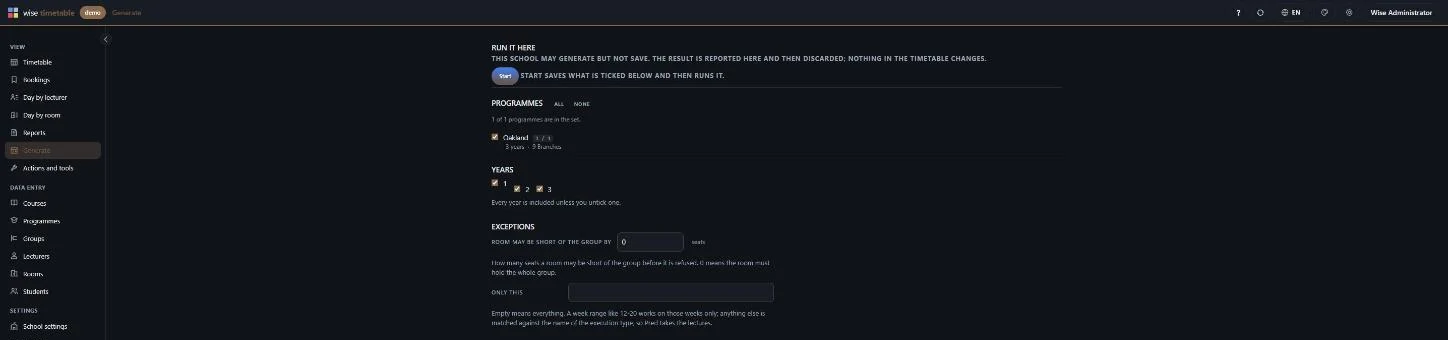
The one usually worth checking first is generation. Running the generator is the thing a web front end normally cannot do, because it is the expensive part. It is here, with its settings, and it runs against the same constraints and the same lecturer availability the desktop uses.
- Courses, their execution types, turns and turn parts — created and edited, not just listed
- Lecturers, rooms, programmes, branches and student groups, with their own edit screens
- Students, including the groups and options they belong to
- Lecturer availability, collected and reviewed
- Automatic generation, with its generating settings, from the browser
- Moving and swapping sessions, with the same clash checking
- Room bookings, including the approval queue
- Substitutions and cover when somebody is absent
- The day overview — one row per lecturer or per room, a whole day across
- Reports, and PDF and Excel output
- Per-school settings, so an institution configures itself
- Sixteen interface languages, switchable by the person using it
Nothing to install, and nothing to keep installed
For a great many institutions this is the whole conversation, and it is worth being precise about what it removes.
There is no installer, no workstation deployment, no virtual desktop infrastructure to publish the application through, and no local administrator rights to negotiate. A member of staff is given an address and an account, and that is the entire onboarding.
The part that matters more over ten years is upgrades. A browser administration is upgraded once, on the server, and everybody is on the new version the next time they open it. There is no version skew between offices, no machine still running last year's build, and no IT ticket in August.
It also removes the operating system from the discussion entirely. A Mac in the dean's office, a Chromebook at the faculty desk and a locked-down Windows machine in the timetabling office all open the same address. That is a property of the browser rather than a feature we built, which is exactly why it is dependable.
- No installer and no deployment package
- No local administrator rights required
- Upgraded once on the server, for everybody at once
- Whatever the machine runs, if it has a current browser it works
- New colleague on Monday: an address and an account
So why do we still ship a desktop application?
Because for one particular person it is genuinely the better tool, and we would rather say so than pretend otherwise.
The person who builds the timetable spends six intense weeks a year inside it, dragging hundreds of sessions across a dense grid, with several windows open at once and a keyboard shortcut for nearly everything. A desktop application is better at that, and the people who do it professionally tend to prefer it strongly. We are not going to take it away from them in order to make a marketing claim simpler.
What has changed is that it is no longer the only way to run the system. An institution that wants that dense grid and those keyboard shortcuts should take the desktop and will be well served by it. An institution that does not want software on its machines takes the browser and gives up nothing — and that used to be a conversation we could not have.
Which should we use?
One decision, made once for the school. Here is where each situation tends to land.
The licence does not distinguish between them. Both are the product and users are not counted either way — see the pricing model for what a licence covers.
Neither choice is a single-user choice. Several people work on one timetable at the same time in a browser school exactly as they do in a desktop school. The desktop mechanism is written up in detail, because it is worth understanding before three people start: several planners on one timetable.
- Your institution does not permit desktop software. The browser administration. Nothing is missing and there is no workaround involved — this is the case the page exists for.
- Several campuses or faculties, each with their own staff. The browser, almost always — there is nothing to deploy and nothing to keep in step across sites.
- Staff who are rarely in the same building, or who change often. The browser: a new colleague needs an address and an account, not a visit.
- A timetabling office of professionals who build the year from scratch. The desktop, usually. Six weeks a year inside a dense grid is what it is built for.
- You are not sure yet. It does not have to be settled before you buy, and the database is the same underneath either way.
Related capabilities
- Several planners at onceHow two or three people work on the same timetable without overwriting each other.
- Installing the desktop clientThe other choice: what installation involves for the institutions that want it.
- Cloud hostingWhere the server lives — hosted by us, or entirely inside your own network.
- Automatic generationThe part a web front end usually cannot do, and what it does with your constraints.
- The browser administration, in screenshotsWeek grid, lesson editing, courses, rooms, generation and settings.
- School edition and university editionTwo editions from one source, and what the school edition changes.
See Wise Timetable on your own data
Book a 45-minute online presentation. We will walk through your institution's scheduling problem, show how Wise Timetable handles it, and answer anything your team wants to test.