Verify, do not refuse
The screen names what is unusual and asks; the office decides, and the reason is kept. Refused is only what the data cannot hold.
The platform
Twenty-five modules, one way of working. The home page says what is waiting, a rule names what is unusual and lets the office decide, nothing is quietly rewritten, and every document can be checked by its code. These are the things a student office notices in its first week.
Every module adds what is waiting for the student office: an exam record nobody has signed off, a request nobody has taken, a payment that fits no invoice, a thesis that needs its committee, an absence nobody has covered, a follow-up due today. Oldest first, the late ones marked, one button to the screen that settles each. An empty list means the work is done.
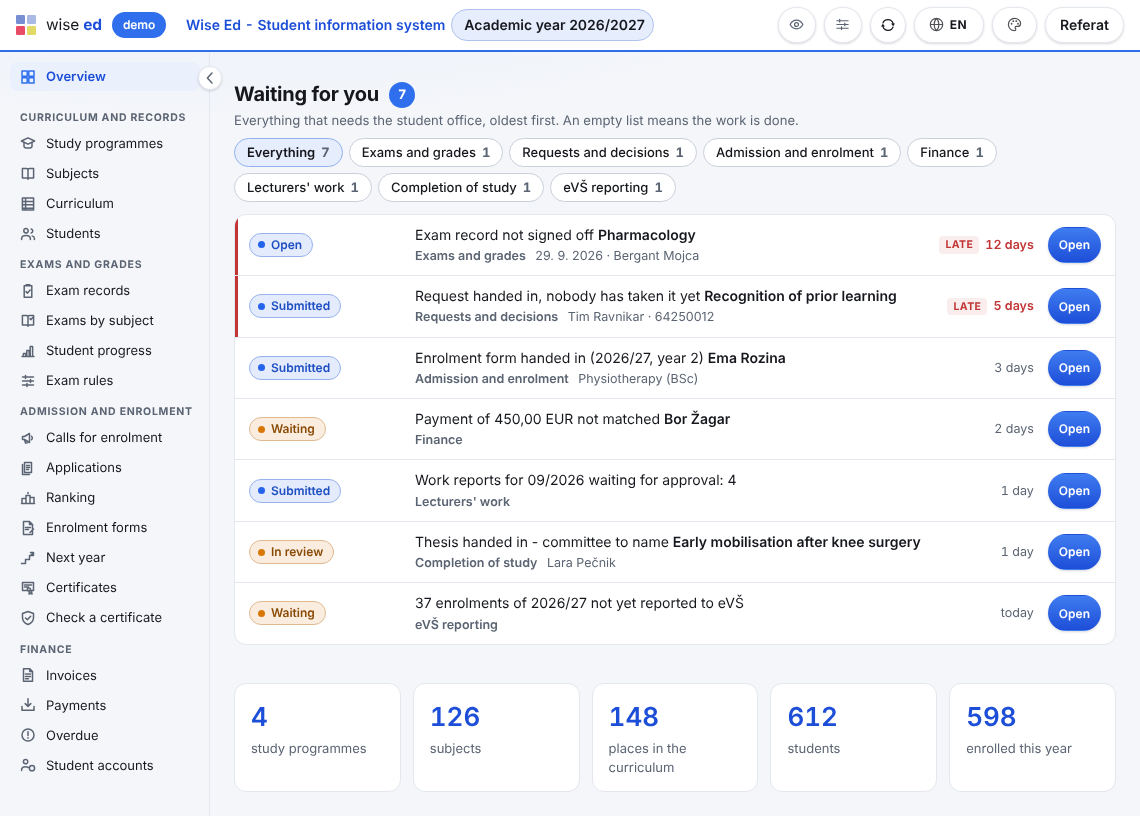
What the modules have in common.
The screen names what is unusual and asks; the office decides, and the reason is kept. Refused is only what the data cannot hold.
Every change is on record with who and when. A grade is corrected by a new entry, an invoice by a credit note, a document by a new issue.
Certificates, decisions, progress reports, diplomas and supplements carry a verification code; a QR code leads to a public check that needs no sign-in.
Office screens in thirteen languages, each user picks their own. Documents in the school’s own languages; national reporting and payment slips per country.
A student, an exam record, a request: everything about it on its own page. Every list has a search, pages of 10 to 100 rows and an export.
The school’s administrator builds roles by unlocking menu items and campuses; a clerk sees only what her role opens.
One button prepares a full export of everything Wise Ed holds for the school — every table as a CSV file, the real files, a description of every column and a checksum of every file. The school presses it whenever it wants, without asking us, and it stays open for 90 days after a licence ends.
Read how it works on data and privacy, and how a school moves in on getting started.
Book an online presentation. We will walk through how your student office works today and show you the same job in Wise Ed — with your programmes, not a demonstration dataset.