Weeks of puzzle-solving every term
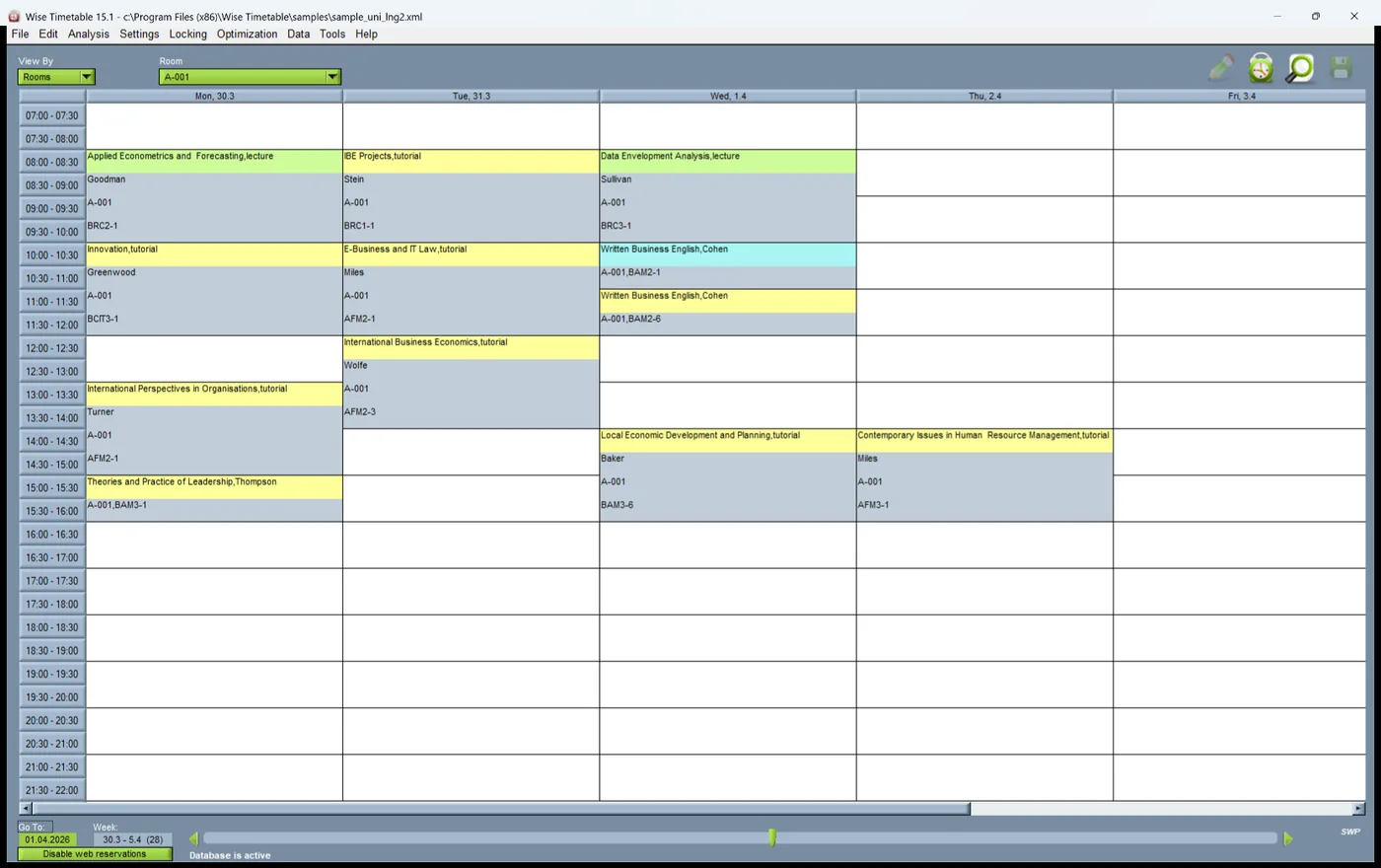
A conflict-free timetable, generated from your own rules in minutes. Lock what must not move, compare variants, and every clash across rooms, lecturers and groups is flagged the instant it appears.

Every term someone has to fit hundreds of lecturers, students and rooms into one timetable, and we know how much rests on them. For over twenty years we have helped them do it: a clash-free timetable and a push notification to every affected phone the moment anything moves. When you need help, you reach people who know timetabling inside out, not a ticket queue.
We came to Wise having assessed the other solutions out there, against a backdrop of clunky software and appalling service. The cost was a concern to us, but I could not have been happier with the Wise solution — they have been extremely helpful and delivered a product that works very well, doing all we ask of it. We do not have any association with Wise other than being a happy customer.

Twenty-three years of university deployments have taught us which problems come first. This is what Wise Timetable does about each of them.
A conflict-free timetable, generated from your own rules in minutes. Lock what must not move, compare variants, and every clash across rooms, lecturers and groups is flagged the instant it appears.
When a class moves, every lecturer and student it affects gets a push notification on their phone, and the web pages, campus screens and calendar feeds update from that same change.
Room booking, exams, the mobile apps, campus signage, reports and a documented API come with the timetable in one licence, all working from the same data — not as add-ons bought one by one.
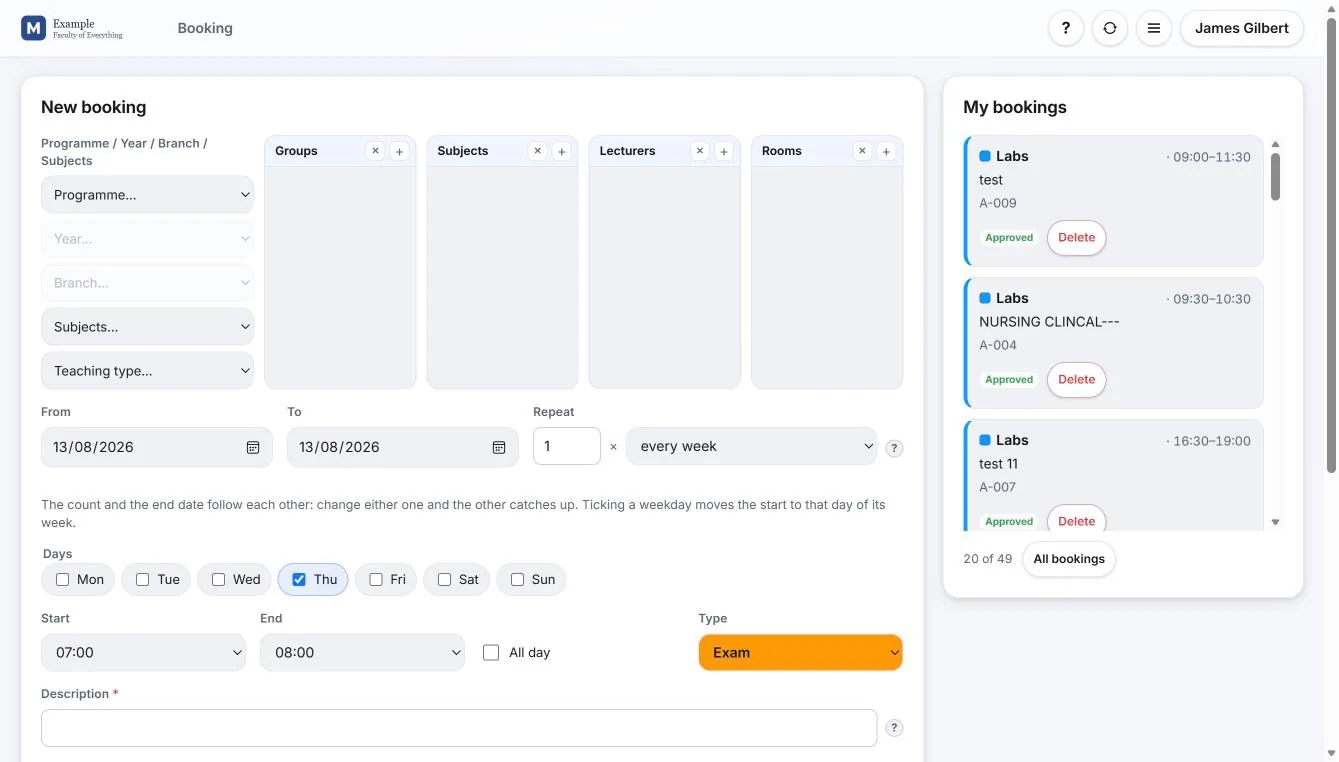
Where your institution allows it, lecturers book the hours they are free in a browser. You watch completion live, reminders go out automatically, and generation runs straight off what they entered.
We set up hosting, import your existing timetable and put your web pages in place in a few days. It is routine for us, and the part we do better than anyone else in our market.
Support is in every licence, not sold as a tier: a named account manager, a 24-hour response target, and the hardest questions answered by our own development team.
Not every institution works this way, and Wise Timetable does not ask you to. Where yours does, lecturers book the hours they are free in a browser and generation runs straight off that availability — nothing to chase, nothing to retype. Lecturer availability, in full.
A room falls through at eleven. A lecturer calls in ill. A session moves one building across campus. The question that decides whether your timetabling system is trusted is not how quickly you can fix it — it is how quickly the people affected find out.
Wise Timetable sends a push notification to the phone of every lecturer and every student a change touches, at the moment it is published. Not a digest overnight, not a notice on a web page nobody thought to reload — a notification on the lock screen, in the free iOS and Android apps, naming what moved and where it moved to.
This is worth being precise about, because it is where most timetabling systems stop. The usual way to publish a schedule to a phone is a calendar subscription or a web page, and both are pull media: the phone asks, on its own schedule, and gets whatever is there. Neither can originate a message. A calendar feed can update silently overnight and the student walks to the old room in the morning — technically correct, practically useless. Publishing is not notifying, and only one of them prevents an empty lecture theatre.
The same event also raises an email to the lecturers involved, refreshes the published web pages and the campus displays, and updates the ICS feeds — from the one change, with nothing to announce by hand. Automated tasks run the whole chain server-side, so there is no step anyone can forget on a bad morning.
Most vendors sell you a generator and then charge separately for room booking, exams, mobile apps and reporting. Wise Timetable includes all of it in one licence.
Excel, CSV, XML, REST API or manual entry — mixed freely. Ready-made templates for common student information systems, and custom import mapped to your own file format.
Where your institution allows it, open the web booking system to your teaching staff and they book the hours they are available themselves. Live completion tracking, automated reminders, and generation runs straight off it.
Working hours, lunch breaks, maximum daily load, room locks, travel time between buildings, condensed or spread teaching — hard rules and soft preferences, handled differently.
One click produces a conflict-free timetable in minutes, not months. Lock anything you want fixed and let the system build around it. Generate several variants and compare them.
Clashes across rooms, lecturers, groups and equipment are detected the instant they are created, with a safe swap tool that tells you whether an exchange is possible before you commit.
Lecturers reserve labs, meeting rooms and consultation slots themselves, limited to the rooms they are entitled to, with an optional approval queue. Fully integrated with the main timetable.
A dedicated final-exam scheduler: it generates the session, seats every candidate and checks clashes student by student.
Ready-made web pages, iOS and Android apps, campus digital signage, PDF and Excel reports, calendar feeds and automated mass email — all from the same source.
A documented REST API for reading and writing, plus scheduled synchronisation with your student information system, HR system and institutional databases.
The whole timetable office, not a viewer: data, lecturer availability, automatic generation, bookings, substitutions and reports. Nothing to install, upgraded once on the server for everybody, and several people work on the same timetable at once.
Elective selection, exam periods and exam registration on the timetable’s own data: students choose and register on their phones, the office is asked rather than refused, and the exam dates and the electives’ groups land in the timetable.
Specialities, hospital departments and the hours each placement owes. A rotation proposed week by week, checked against capacity and lectures, written into the timetable as lessons.
From the makers of Wise Timetable: the student office’s work from the first enquiry to the diploma — admission and enrolment, exams and grades, attendance, fees, requests, theses, lecturers’ work, and portals for students and parents — on the timetable your institution already has.
 a surprising price (positively ☺︎)
Support is part of every licence, not a tier you upgrade into, and it does not end after the first year. It continues for as long as you use the system, at no extra cost.
Every request is logged in a tracked help desk, so nothing gets lost — and every one is answered by people, by email or by telephone. The hardest go straight to second-line support, which is the core development team itself: the people who wrote the code you are asking about.
And when your institution needs something the system does not do yet, tell us. Nearly every capability on this site exists because a university asked for it and we built it, rather than explaining why it was out of scope.
Where support enters the price, it is for cover beyond this: faster answers, or support outside working hours and through the enrolment weeks.
Eight institutions signed reference letters for us between 29 September and 1 October 2026. Here are four of them, word for word — the highlighting is ours, and … marks a sentence left out. All eight are on Why Wise Timetable.

This term Wise Technologies moved us to its new web platform: our existing bookings were carried over, the old links keep working, and colleagues found the new pages clear and intuitive. We have found the service reliable and the support prompt and personal.

Existing links and QR codes continue to work, student enrolment data from our own export is imported automatically, and students find their personal timetable by entering their student number. … The move was completed quickly, and Wise Technologies answered each of our requests the same day.

The timetable is published on the web for students and staff and shown on a screen in the entrance hall of our building. The licence is renewed every year, and the system is part of our everyday work. Our experience with Wise Technologies is very positive: questions and problems are solved quickly, outside working hours as well when needed.

The timetables are published on the web and on information screens in our faculties, including touch-screen kiosks. In September 2026 they moved to the new Wise Timetable web platform, and all existing addresses and QR codes continue to work. Wise Technologies supports us remotely, reliably and promptly.
Cloud services can be live in a day, and your existing timetable imported with its web pages in place within a few days. The honest answer is that a first full cycle takes a few weeks, most of it spent on your data and your integrations rather than on our software.
We host on AWS or install on your own servers, then help you build the initial programme hierarchy and organisational structure. You do not start from an empty database.
Import what you already have from Excel, your SIS or an API — including the timetable you run today.
Define constraints, run generation, review the result. Mix automatic and manual placement freely: lock what must not move, let the system solve the rest.
Lecturers verify before release. Then publish to web, mobile, signage and email. Mid-term changes take a few clicks and notify everyone affected automatically.
The same licence covers a single faculty and a twelve-site university. Pick the closest starting point.
Faculties with their own scheduling autonomy, shared central resources, and a registrar who has to reconcile both.
Travel time between sites treated as a real constraint, not an afterthought, with per-campus and consolidated views.
Clinical rotations planned and handed to the timetable, small-group teaching, laboratory sessions and exam periods alongside conventional lectures.
Laboratory capacity, split cohorts, equipment-bound sessions and heavy practical loads.
Smaller teams without dedicated timetabling staff, where the software has to be usable by one administrator.
Gender-segregated teaching, Friday and Ramadan calendars, Arabic and English interfaces, and regional data residency.
Cloud services can be set up within a single day. The full process usually runs a few weeks, dominated by data preparation and any integration with systems we have not met before. Training takes three to five days, after which your team is working independently.
Support does not stop at go-live; it continues for as long as you use the system, at no extra cost.
Wise Timetable is licensed per independent timetable — not per user, per student or per module — and the figure is built from a published list of parameters: the size of the institution, the complexity of its timetable, the number of campuses, the integrations required, and the hosting, security and support commitments behind it.
The pricing page sets out every one of those parameters, and publishes the entry figure for the simplest case we serve — a small school with one site and one timetable. Unlimited programmes, courses and entities run under a single timetable licence.
No. The whole administration is available in a browser — courses, lecturers, rooms, programmes, students, bookings, lecturer availability, automatic generation, reports and PDF or Excel output. There is no installer, no deployment package and no local administrator rights to arrange.
There is also a desktop application, and timetabling offices that build the year from scratch often prefer it. An institution runs one or the other rather than a mixture, and either way several people can work on the same timetable at once. Administration in a browser.
Yes, and this is how most institutions work. Place the sessions that must not move, lock them individually or lock the entire timetable built so far in one action, and run generation. Locked sessions are marked with a key icon and are never touched. The system schedules everything else around them.
Excel and CSV import covers most cases, XML is supported, and there is a documented REST API for direct integration. Ready-made templates exist for common setups, and custom imports can be mapped to your own file format.
Automated import and manual adjustment can be combined at any point, so you are never forced to choose one route for everything.
Book a 45-minute online presentation. Bring a real scheduling problem from your institution and we will show you how it is handled — not a canned demo dataset.