Student portal
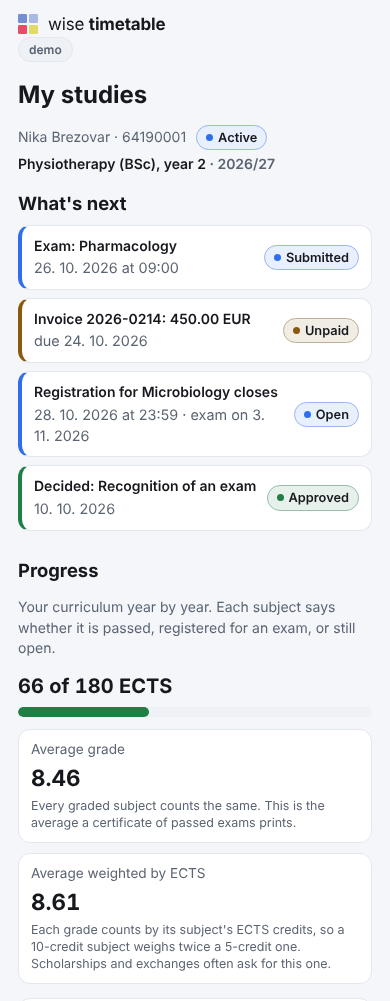
“My study” on a phone: what is next, progress, invoices, documents, requests.
Who it is for
A student’s whole study on one page of the school’s timetable site, made for a phone: what needs them next, how far they are in the curriculum, their documents, invoices and requests. They sign in once per device with their enrolment number and a six-digit code sent to their student e-mail, and the same sign-in opens exam registration, electives and attendance.
The first page says who the student is and then, in this order: what is next, messages, progress, enrolment and documents, invoices and payments, and the way to requests, the thesis and personal data.
The school decides which are switched on, so a part may be missing for you.
“My study” on a phone: what is next, progress, invoices, documents, requests.
Calls, applications, ranking, the online enrolment form and certificates.
Exam records, online grade entry, rules that say why, sign-off and the transcript.
Students’ requests with attachments, answered with numbered decisions.
Price list, instalments, invoices with a payment QR code, payments, aid and payouts.
The thesis from topic to defence, the diploma and the Diploma Supplement.
An adult student decides, person by person and part by part, what a parent, a payer or a sponsor sees: the timetable, exams, grades and progress, attendance, announcements, invoices. A change takes effect at once, and the student can see who looked at what.
A payer sees the invoices addressed to them without the student’s consent, and nothing else unless the student shares it. Below the age of majority the school decides what guardians see, and the page says what that is. More on third-party access.
On your school’s timetable site, under My studies. Type your enrolment number and the six-digit code from your student e-mail, or use your school’s Microsoft account where the school signs in that way. The device then stays signed in.
On the timetable’s exam registration page, with the same sign-in. My studies shows your exams under what is next and leads there.
Only if you share them, once you are of age. Under age, the school decides and your page says what it shows.
Book an online presentation. We will walk through how your student office works today and show you the same job in Wise Ed — with your programmes, not a demonstration dataset.