Student records
Programmes, subjects, the curriculum and the student record, every change kept.
Who it is for
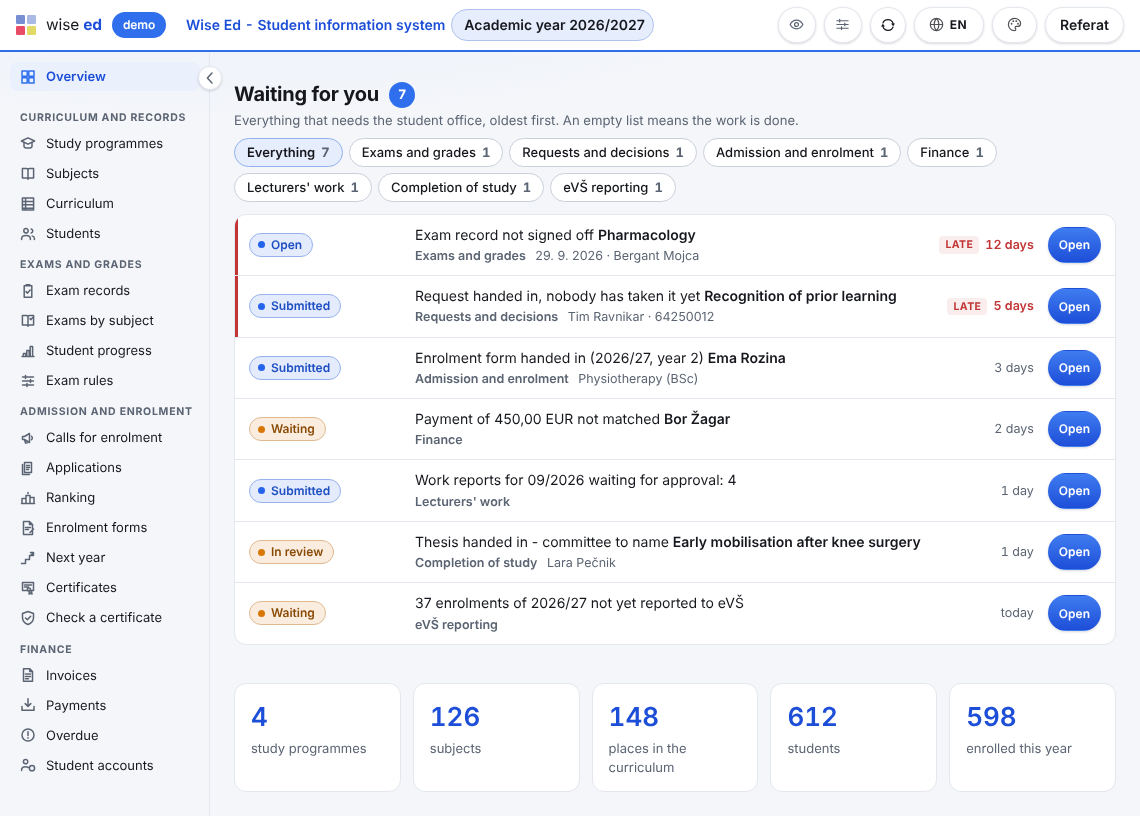
The office opens Wise Ed and sees what is waiting for it, oldest first, with one button to the screen that settles each row. Students hand in forms and requests online, lecturers enter their own grades and their month, and the bank statement matches itself to the invoices. What is left for the office is the deciding.
Every module the school uses adds its rows to one list on the home page: an exam record nobody has signed off, a request past its target, a payment that fits no invoice, a thesis whose committee is not named. Each row says what waits, about whom, and for how long; the late ones are marked. An empty list means the work is done.
Each has its own page with what it does, how it goes and what it does not do yet.
Programmes, subjects, the curriculum and the student record, every change kept.
The web enquiry form, walk-ins, campaigns and admissions counsellors with their follow-ups.
Calls, applications, ranking, the online enrolment form and certificates.
Exam records, online grade entry, rules that say why, sign-off and the transcript.
Price list, instalments, invoices with a payment QR code, payments, aid and payouts.
Students’ requests with attachments, answered with numbered decisions.
Whoever administers Wise Ed at the school builds roles from menu items, each closed, open to view or open to view and change, and limits a role to some campuses where the school has more than one.
Not for what Wise Ed covers. Students confirm their enrolment form and their requests with a one-time code sent to their e-mail instead of a signature, and decisions, certificates and diplomas carry a verification code that anybody can check without signing in.
The rules say why and until when, and the office can set one aside with a reason that is kept. Wise Ed does not decide for the office; it makes sure the decision is written down.
The guide for the student office walks through the everyday jobs step by step, and the question mark in the office’s top bar opens the PDF guide in your language.
Yes. The records, the timetable sync and the settings are always on; every other module is switched on or off in one panel, and switching one off deletes nothing.
Book an online presentation. We will walk through how your student office works today and show you the same job in Wise Ed — with your programmes, not a demonstration dataset.