
Booking
The web booking module
One address does two jobs. Anyone can read the timetable in it without an account; staff who sign in book rooms straight into the live schedule. Both halves are in the licence.
- Included in the licence
- No account for students
- Your branding
One address, two halves
The web module is not a separate product with its own database. It is a front end onto the timetable your office is working in, which is why a room change made at 11:00 is on the web at 11:00.
The half that needs no account is what a faculty links to from its own site. There is nothing to install, nothing to sign up for and no app to download first — a student opens a page and picks their group.
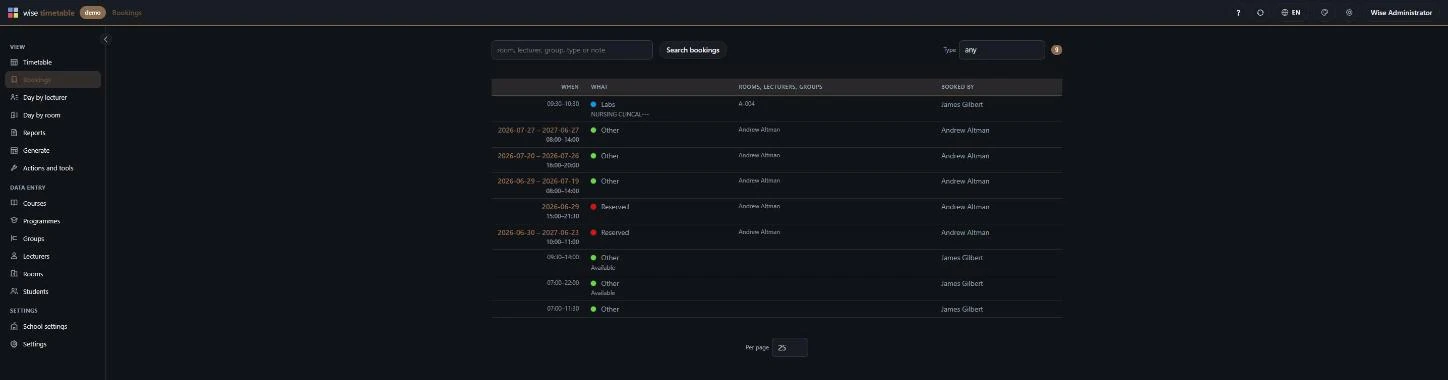
The half behind the sign-in is the booking system. Staff reserve rooms, laboratories, meeting slots and consultation hours directly into the timetable, restricted to the rooms they are entitled to. Nothing is copied anywhere and nothing synchronises overnight, so a booking and a lecture cannot collide.
Most vendors in this market sell the second half as a separate room-booking product. Ours is the same system, on the same data, at no additional licence cost.
What a visitor gets, with no account at all
- The week for any group, subject, lecturer or room, chosen from up to four pickers — and the institution decides which of the four are offered
- Every view has its own address, so a filtered week can be bookmarked, posted by a course representative or mailed to a colleague, and it opens exactly as it was left
- Five ways to draw a week, from the school’s full day down to fully compressed for one glance on a phone
- A room overview: one day, every room, which is the screen that answers what is free rather than where is my class
- Reports over any date range, or the winter, summer or whole year in one click, downloadable as Excel or PDF
- A live calendar subscription, not only a one-off export — a room change on Tuesday reaches the subscriber’s own calendar on Tuesday
- Class detail with rooms, lecturers, teaching type and groups, plus the link to the online lecture and the materials where the faculty has recorded them
- The interface language chosen per visitor rather than per installation, and a light and a dark theme
What signing in adds
Signing in changes the page rather than replacing it. The timetable is still the timetable; the empty stretches of it become clickable.
The quickest booking is not the booking form at all: find the gap you want, on the week view or the room overview, and click it. The form opens with that date, that hour and that room already filled in. Two clicks, from seeing a gap to holding it.
A booking carries the groups, subjects, lecturers and rooms it concerns, its own booking type in the institution’s colours, a required public description and a private internal note. It can repeat across a term, and the repeat count and the end date follow each other so neither has to be worked out.
Accounts are not a second user list to maintain. They are the lecturer records in the timetable database, so somebody who leaves the lecturer list loses their booking access at the same moment. Where an institution runs its own central login, that is used instead: Shibboleth and comparable federated identity systems are supported.
The availability check is the part that earns its keep
Before anything is reserved, the module works out every single date the booking would actually fall on — one afternoon, or every Tuesday until June — and asks the timetable what is on each of them.
For each date it looks at everything you have chosen: every room, every lecturer and every group. A room that is free at that hour but a lecturer who is already teaching is still a clash, and it is reported as one. Booking screens that check only the room are how a professor ends up double-booked by an administrator who did everything right.
Two behaviours in it are deliberate and worth stating. Touching is not overlapping: a class that ends at 09:00 and a booking that starts at 09:00 are consecutive, not a double booking. And a booking still waiting for approval counts as taken — somebody asked for that room first, so it is not free.
The answer is a count, and where something is in the way it also offers the nearest times the whole booking would fit. Checking reserves nothing.
It is your institution’s module, not ours
- Your logo in the corner, linking to your own site rather than to us, and your colours for each teaching type — taken from the same table the timetabling office already maintains
- Which of the four pickers visitors are offered, so a faculty that does not want its room list browsable can switch that one off
- Whether new bookings need approval, for the whole school, in one setting
- How far ahead the timetable is published, so a half-built next semester stays private
- Whether the week shows five, six or seven days, and which day it starts on
- One named person holds the settings; everybody else sees them read-only
- Hosted by us on AWS, or installed entirely inside your own network where the data must not leave it
Questions institutions ask
Is the web module priced separately?
No. The desktop software, the web module, the mobile apps, room booking, exam scheduling and the REST API are one product on one licence. There is no feature tier and no per-module extra.
Do students need accounts?
No, and that is the point. Reading the timetable needs no account, no installation and no app. Signing in exists only for staff who book rooms.
Can we put it inside our own website?
Yes. It carries your mark and your colours, and every view has a stable address, so it can be linked or embedded. How web publishing works covers the embedding side.
Does it update, or is it a copy?
It reads the live timetable. There is no nightly synchronisation to be out of date, which is the failure mode of a bolted-on room-booking product.
Can a booking be private?
Yes. Each booking chooses whether it appears on the public timetable. A viva or a disciplinary meeting is a real booking that blocks a real room and does not belong on a public page.
Is there a document we can give our staff?
Three, below, free and ungated: one for students, one for lecturers and one for whoever holds the settings. They are the application’s own manuals — the same PDFs it serves behind its ? button — so they cannot drift away from what the software does.
Whoever decides what the school sends by e-mail — the booking letters among it — has a fourth, the guide to notifications.
The manuals, free and ungated
- Guide for students (PDF, 10 pages)Finding your own timetable, narrowing it by group, subject, lecturer or room, the five ways to make a week fit the screen, opening one class in full, printing, and subscribing to it from your own calendar. No account needed for any of it, and this is the guide the other two are built on. Inside the application each of the three opens in the reader’s own language, in any of the thirteen languages the interface speaks.
- Guide for lecturers (PDF, 8 pages)The staff half: signing in, booking a room in two clicks from an empty slot, repeating across a term, what the availability check tests before you commit, and the reports. It does not repeat the student guide — it is short because it says so and points at it.
- Guide for administrators (PDF, 13 pages)Every decision a faculty makes about its own installation, on one screen: the filters visitors are offered, how far ahead the timetable is published, the report header, the crest and the colours, and the screens in the corridors. Nothing in it needs a server.
- All published manualsOver thirty documents and the ISO/IEC 27001 certificate, including the 278-page desktop manual and the full REST API reference. All open, none behind a form.
Related capabilities
- Room booking systemBooking rights per room, the approval workflow, and the event types an institution defines.
- Lecturer portalThe same module from one lecturer's point of view: signing in, booking in two clicks, repeating across a term.
- Student portalThe reading half in detail: the pickers, the five view modes and the bookmarkable address.
- Web publishingLinking it from your own site, and what visitors see before they choose anything.
See Wise Timetable on your own data
Book a 45-minute online presentation. We will walk through your institution's scheduling problem, show how Wise Timetable handles it, and answer anything your team wants to test.