
Publishing
Mass email that is actually personalised
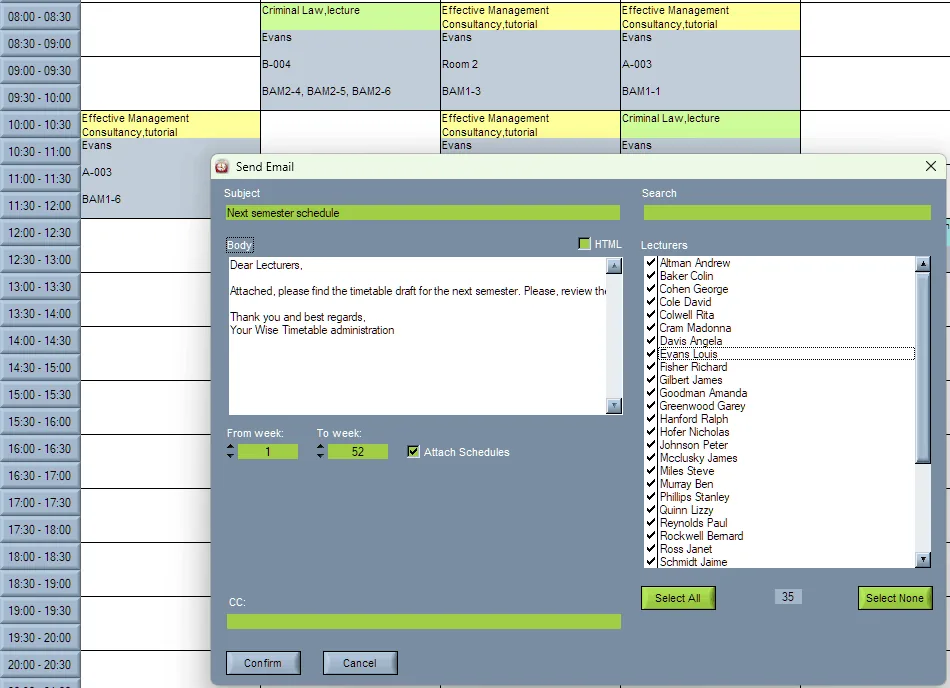
Sending four hundred lecturers the same PDF of the faculty timetable is not communication. Wise Timetable emails each person their own schedule, automatically.
What gets sent, and when
- Personalised timetables to lecturers at the start of each term
- Personalised schedules to student groups
- Change notices to exactly the people a change affects
- Booking confirmations, approvals and denials
- Automated reminders to lecturers who have not submitted their availability
- Timetable reminders ahead of teaching sessions
Why automation matters here
The reminder function is the one institutions underestimate. When you open the booking system for lecturers to submit their available hours, roughly a third will not respond to the first request. Chasing them by hand is where a timetabling office loses a week.
One automated reminder, targeted only at the people who have not yet responded, recovers most of that week. See how availability collection works.
Who the letters come from
A letter a lecturer cannot answer is half a letter. Where the answers go is the school’s decision, made on one tab.
Every letter the web application sends — the booking letters, the answers to bookings that need approval, the test letters — goes through one decision, made under Settings ▸ Notifications on the school’s own timetable site by its administrators. Since Wise Timetable 15.4.76 so do the letters a planner sends from the desktop.
There are three answers. With nothing filled in, letters leave from the Wise Timetable mailbox and replies come to us. With a reply address, they still leave from our mailbox but the answers go to the timetable office — no password, nothing to set up anywhere else, and for most schools the whole answer. With the school’s own mailbox filled in, its own address is in the From line and the replies are its own.
The desktop never learns that mailbox’s password: it hands each finished letter to the Wise Timetable server over the ordinary web port, and the server sends it with the school’s account — so a university network that blocks outgoing mail ports stops mattering. The weekly letter to lecturers moves onto the same road with the mailing server’s next release; until then it leaves from the Wise Timetable mailbox.
- Any mail server that takes a password. Microsoft 365 is smtp.office365.com, port 587, STARTTLS; Gmail and Google Workspace are smtp.gmail.com, 465 with SSL or 587 with STARTTLS. An application password is better than the mailbox’s everyday one.
- The password is written once and never shown again — not on that screen and not anywhere else — because it is sealed with a key that exists only on our server.
- One test e-mail tells you the truth. It goes out through exactly the saved settings, and a refusal is shown in red, word for word, until a letter gets through again.
- Microsoft 365: ask IT first. Many organisations switch password sending (SMTP AUTH) off, and Microsoft has announced it switches it off by default in existing organisations at the end of December 2026, though an organisation’s administrator can switch it back on. The reply address keeps working either way: it needs no password at all.
Each lecturer gets their own week, once a week
The weekly letter walks the lecturer list one person at a time: each letter carries that lecturer’s own week and a link that opens their timetable on exactly that week, and a lecturer with nothing scheduled is skipped. There are two jobs, next week’s timetable and this week’s, each switched on or off on its own, with its own day and hour.
The school writes the letter itself, on the same tab: a general text for everybody and, where it wants one, a letter per language — placeholders fill in each lecturer’s name, the week and their own link. One real test letter goes to an address of your choosing before three hundred people see it. Emailing weekly timetables to lecturers walks through it.
Booking letters, worded by the faculty
When a room is booked or a booking is cancelled, the people it concerns hear about it in the faculty’s own words.
With Send mail ticked on the booking form, saving or deleting a booking sends a letter to the addresses typed in its Email box, to the booked rooms that have an address of their own and, with To lecturers ticked, to every lecturer on the booking. Each of them gets a letter of their own, so nobody sees anybody else’s address and one wrong address does not stop the rest.
There are two letters, one for a saved booking and one for a deleted one, each with a subject and a text the faculty writes on the Notifications tab. Words in angle brackets — <START_DATE>, <ROOMS>, <TUTORS>, <GROUPS>, <LOGGED_USER> and the rest — are replaced with the details of the booking. An empty box sends the built-in letter, in Slovenian, Croatian or English by the language of the screen the booking was made on.
- A letter never undoes a booking. The booking is saved before any letter is written, so a slow or refusing mail server cannot lose it, and nobody books the same room twice believing the first attempt failed.
- Whether the box starts ticked is the faculty’s call, set once on the same tab.
- Replies go to the person who booked when the letter leaves from our mailbox and no reply address is set — a lecturer asking to move it to eleven is writing to them, not to the office.
Related capabilities
See Wise Timetable on your own data
Book a 45-minute online presentation. We will walk through your institution's scheduling problem, show how Wise Timetable handles it, and answer anything your team wants to test.