Department capacity
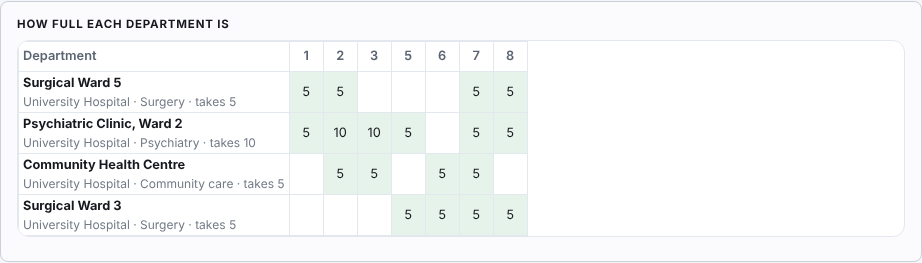
Under the grid, how full each department is week by week. A week over its capacity is marked.

Student affairs
A rotation is a group of students passing a department of each speciality in turn, for weeks at a time, at sites the institution does not own. Wise Timetable plans it, checks it against the lectures the same students still have, and writes it into the timetable as ordinary lessons.
Some medical and nursing faculties already keep their rotations in the timetable by hand: a hospital department entered as a room, a run of weeks entered as a lesson of a small group. It works, and it is slow, because the timetable does not know what the rotation is for.
The module keeps exactly that shape and adds what the hand-made version lacks — which specialities a group still owes, how full each department is, which weeks the group still has lectures — so that a year’s plan becomes a proposal to check rather than a puzzle to solve.
The screen shows the six in order above every tab, ticks the ones that are done and says what is missing from the next.
What students rotate through — surgery, psychiatry, community care. The usual ones are added in one click and renamed as your institution calls them, each with a short tag for the grid.
A site is the hospital or health centre, with its coordinator and the language of its lists. A department is a room of the timetable at that site, of one speciality, taking so many students at a time, with its mentors from the lecturer list.
The clinical part of the course the students owe hours in: how many hours, on which days and at what times, and how many weeks of each speciality.
The weeks it runs over, the weeks without placements — holidays, exam weeks — and the groups that rotate.
A proposal of where every group is, week by week: within every rule where that is possible, otherwise the least bad plan with each breach named. Blocks placed by hand stay where they are.
The blocks become ordinary lessons. A second hand-off changes only what changed since the first.
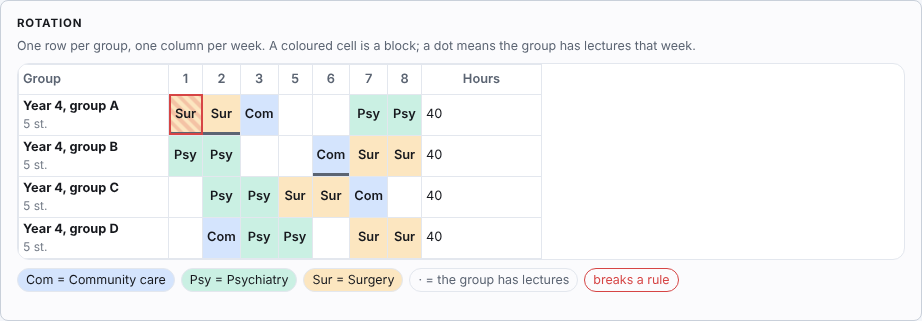
Nothing is refused. Everything is named, and the person planning decides.
Under the grid, how full each department is week by week. A week over its capacity is marked.
A week in which the group still has lectures carries a dot, and a block over it names the lectures in the way.
Each group’s planned hours against the hours the placement owes. Fewer is said, not hidden.
When a block cannot be placed — no department of that speciality yet, or every one full — Generate says so as a warning naming the group and the speciality, never as a success.
Move a block to another department or week and it is locked: the next proposal leaves it alone. A move that breaks a rule is asked, not refused.
Before the hand-off writes lessons, it checks the version each computer last published the timetable with, because an older one would overwrite them, and names any that needs updating.
Each student has a page of their own on the phone. It shows where they are this week — the site, the department and the speciality — with the address and a map link, the days and times, their mentors, their hours so far against the hours they owe, and the whole rotation marked done, now and coming. Between blocks it says where they go next, and from when.
They sign in once, with their enrolment number and a code sent to their e-mail, or with their institution’s Microsoft account. And because the plan is ordinary lessons, it is in their timetable on the web, in the mobile apps and in their calendar subscription too.
The page shows what the timetable holds, not what is being drafted: a plan the office is still working on reaches nobody until it is handed to the timetable.
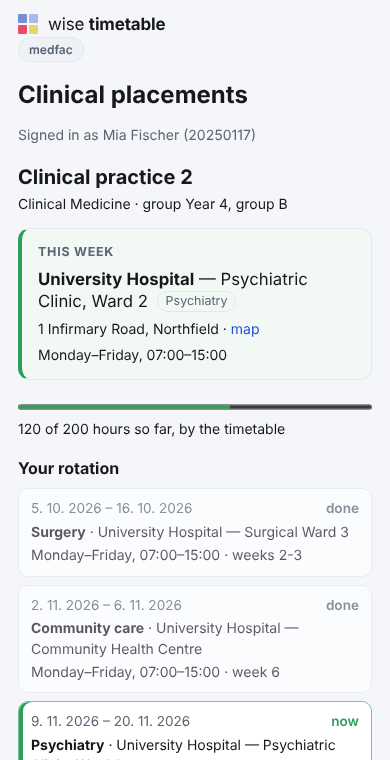
Mentors do not yet confirm attendance from their side, so the hours so far are counted from the timetable — and the student’s page says so. Lists for the sites’ coordinators, in each site’s own language, are not sent yet either. Both are the module’s next steps.
Two guides, in English, Slovenian and Croatian — the same PDFs the application opens for the reader in their own language. The guide for the student office (4 pages) walks the six steps, the grid, moving a block and the hand-off (Slovenian, Croatian). The guide for students (2 pages) is the sign-in and what the page shows (Slovenian, Croatian).
Book a 45-minute online presentation. We will walk through your institution's scheduling problem, show how Wise Timetable handles it, and answer anything your team wants to test.