The same year
Two exams of the same programme and year on one day, or closer together than the period allows.

Student affairs
Before an exam period there are dates to find: every course, a few dates each, none on the same day as another exam of the same year, none in a room that is already taken. Wise Timetable proposes them, names every clash, books the rooms when you publish — and, where students register for exams here, keeps the lists.
The desktop’s final exam scheduler seats a session’s candidates hall by hall. This is the student office’s side of the exam calendar, in the browser: which course is examined on which days of a period, and in which rooms.
Written, oral, midterm — as your institution names them. A midterm type does not count teaching that is still running as a clash.
The first and last day, how many dates each course gets, the fewest days between two dates of one course and between two exams of the same year, the start times, the weekdays, the programmes and years it covers and the rooms it may use.
Every course of the period with its examiners, taken from the timetable unless you choose others, the students expected, counted from its groups, and the exam’s length. Leave a course out, or change any of it.
Generate places every course’s dates. A date placed or moved by hand is locked, and the next proposal keeps it.
Every date is checked and every reason is written out. Nothing is blocked: you decide.
The rooms are booked in the timetable, and the exams appear on the web, in the mobile apps and in calendar subscriptions for each student’s courses.
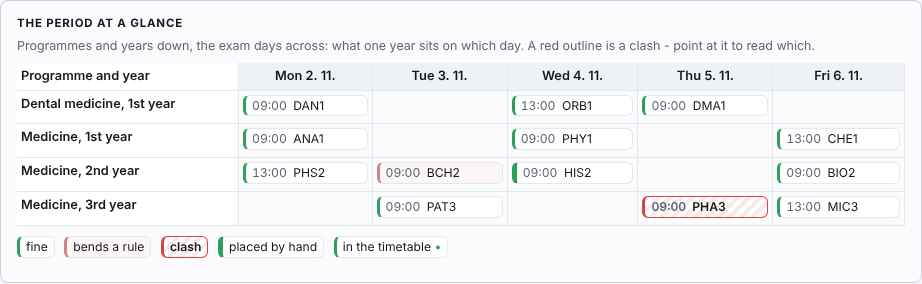
A calendar of programmes and years against the exam days shows what each year sits on which day; a date with a clash is outlined, and the list beside it says why.
Two exams of the same programme and year on one day, or closer together than the period allows.
Students who sit both exams, counted from their groups and the subjects they are registered for — at the same time, or too close.
An examiner or a room already taken by teaching, a booking or another exam; a room too small for the students expected.
Lessons the same students still have that day — not counted for a midterm.
Two dates of one course closer together than the fewest days you set.
A holiday, a weekday the period does not hold exams on, a day outside the period or outside the timetable’s year, a start time that is not on the bell schedule.
Publish says first what it will write, change and take out, and how many dates still have a clash. Each date then becomes one approved booking of the exam booking type, with all its rooms, its examiners and the course’s groups — so the exam is in every one of its students’ timetables, and anyone booking the room over it is told it is taken. Publishing again changes only what changed.
Whether exams show on the public timetable or only to people who are signed in is that booking type’s own switch, which the institution already has. After publishing, every change is kept with how many people it touches, and every date — rooms, examiners, expected students — is exported as a CSV for the student information system.
For institutions where students register for exams in Wise Timetable rather than in a student information system.
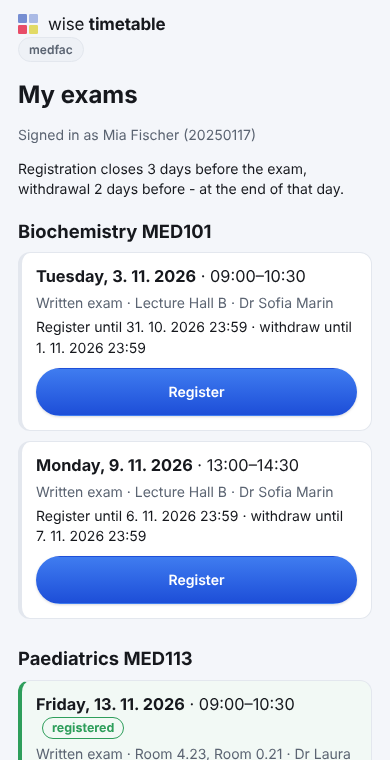
Students register on their phone: each of their courses with its published dates, one tap to register and one to withdraw. Every date says until when, and when a student cannot register it says why — registration has closed, they are already registered for another date of the course, the exam has taken place, or the student records say no.
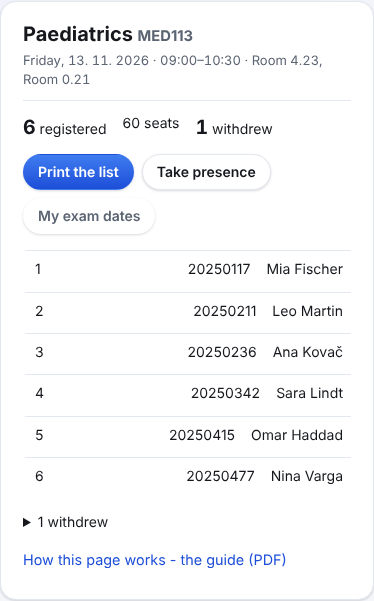
The examiner signs in to the web timetable as they do to book a room, and sees every exam that names them, with how many are registered. One exam opens its list: the students, the seats and who withdrew. Printed, it has a column to sign and three empty lines for anyone who comes without registering.
Where the institution sets a time for it, each examiner also gets the list by e-mail the day before the exam, at that time, to the address on their lecturer record.
Where the institution has switched attendance on, presence is taken the same way as at a lesson — the examiner shows the code, the students scan — and the list then shows who came.
It keeps no grades, fees or attempts: those stay in the student information system. An institution that registers for exams there keeps doing so, and uses only the exam periods and dates.
Lecturers proposing their own exam dates, and letters to students when a published date moves, come next. Until then every change after publishing is recorded, with who it touches.
Three guides, in English, Slovenian and Croatian — the same PDFs the application opens for each reader. The guide for the student office (7 pages): periods and rules, the calendar and its clashes, publishing, registrations and the student records (Slovenian, Croatian). The guide for students (2 pages) (Slovenian, Croatian), and the guide for examiners (2 pages) (Slovenian, Croatian).
Book a 45-minute online presentation. We will walk through your institution's scheduling problem, show how Wise Timetable handles it, and answer anything your team wants to test.