
Companion product
The Option Selector
Students pick and rank the optional modules they want, online, inside the rules their programme sets. The university then knows real demand before it builds the timetable — rather than guessing, and discovering in week two that a seminar has four students and another has ninety.
- Students choose and rank
- Live validation against programme rules
- Real demand before you schedule
The problem it removes
Optional modules are where timetables go wrong, because the institution builds the schedule before it knows who wants what.
The traditional sequence is: publish the options, build a timetable on last year's numbers or an educated guess, let students choose, then discover the guess was wrong. Two popular options clash. A seminar room booked for thirty has eight people in it. Somebody spends September unpicking it by hand.
The Option Selector inverts the order. Students make their choices in a web application first, inside the rules their programme sets, and the administration has real numbers — and ranked preferences — before a single session is placed.
It was originally built for a department at the University of Oxford, whose degree structure makes optional-module choice unusually consequential, and it has stayed close to how a university with genuinely complex option rules actually works.
What the student does
The student signs in — with institutional credentials, or through single sign-on, Active Directory or Shibboleth where the university uses it — and picks their programme from the list. Only one, and the interface says so plainly.
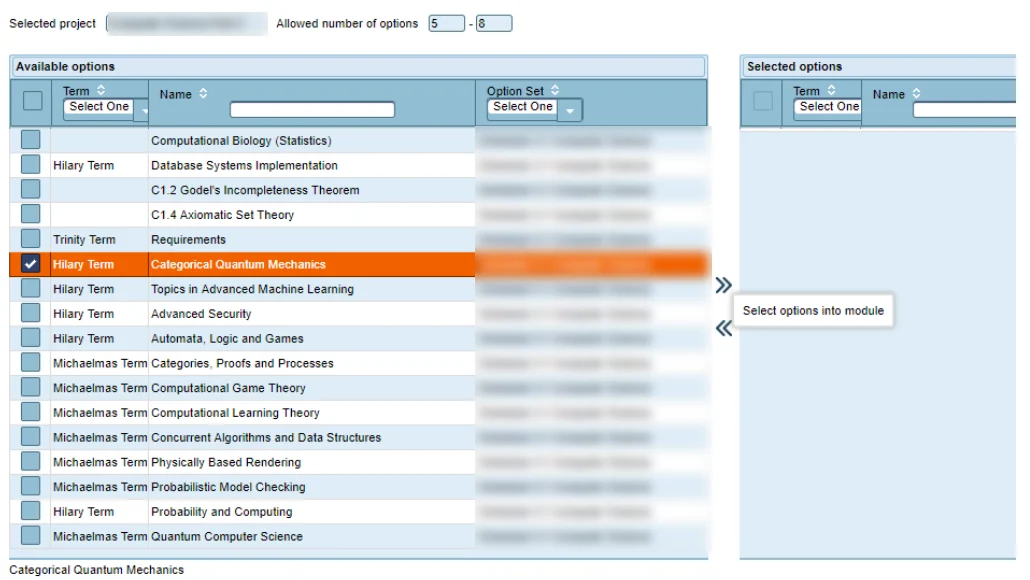
The available options for that programme appear, filterable by term, by name and by option set. Clicking any option shows its full description at the foot of the screen; the description is HTML, so it can carry links out to the university's own knowledge base rather than duplicating the prospectus.
The student then moves the options they want into their selection, and here the system does the work the administration would otherwise do by hand: it validates continuously against the rules.
- Minimum and maximum number of options for the programme, enforced live
- Separate minimum and maximum per option set, so “five from Schedule C1 and two from C2” is a rule the system checks rather than a sentence in a handbook
- A running status line — expected 5 to 8, currently 3, status: NOT OK — so a student always knows whether they are finished
- Confirmation is deliberate and final: once confirmed, changes are no longer possible, and the interface warns before that point
Ranking is the part that pays for itself
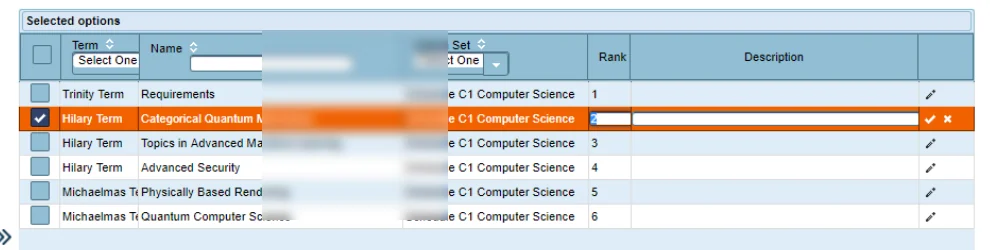
A student does not merely choose; they rank. Rank 1 is the highest, any positive integer below that, and ties are allowed where a student genuinely has no preference. Ranking defaults sensibly to selection order, so a student who does not care is not forced to think about it.
Each option can also carry a free-text note explaining why it was chosen, or why it should survive if something has to give.
That combination is what makes an oversubscribed module solvable. When a seminar capped at twenty attracts thirty-five, the administration is not choosing at random or by who submitted first — it can see who ranked it top and who ranked it fourth, and what they said about it.
What the administration does
The other half of the application, and where the option sets are built.
The final report is the point of the exercise: real, ranked demand per option, ready to inform the timetable rather than contradict it.
- Create a project — typically one programme and year — and set its basic parameters
- Build option sets, the groupings that carry their own minimum and maximum rules
- Import options in bulk, then edit them individually; term names are configurable to the institution's own
- Select which options belong to which project, with final corrections before release
- Open the selection season deliberately, so choices are only accepted in the window you intend
- Alter student enrolment data where a case needs manual handling
- Filter and search across everything as the numbers come in
- Produce the final report, plus assorted exports for whatever comes next
How it reaches the timetable
The output tells you which students take which options, in what numbers, with what preference strength. That is precisely the input an automatic generation run needs in order to avoid clashing two options that a large number of students both chose.
It also sizes rooms honestly. A module with sixty confirmed choices is not scheduled into a room for thirty, and a module with nine does not occupy the lecture theatre.
Documentation
Both manuals, as published to users.
Related
- Automatic generationWhat consumes the demand data.
- Lecturer availabilityThe same idea, applied to staff.
- All companion productsTime Planner, Event Planner, Exam Planner.
- Combining student groups for a single classMerging cohorts is routine. Getting the room size right for a merged cohort is where it usually goes wrong.
See the Option Selector for yourself
Tell us how your organisation schedules today and we will show you the Option Selector running against that, rather than a demonstration dataset chosen to make the software look good.