wiseed

Money and staff

Travel orders

An employee asks for a trip, the superior approves it, and after the trip the employee hands in the claim with the receipts. Per diems, mileage and the amount to pay out are worked out by the country’s rules, the trip’s days go into the staff record by themselves, and the office settles the order and prints it.

  • Per diems by the country’s rules
  • Several countries on one trip
  • Receipts with a photo or PDF
  • The trip’s days in the staff record

From request to payment

  1. The order is asked for

    By the employee on their own page or by the office: purpose, destination, departure and return, transport, vehicle and planned kilometres, an advance. An estimate shows at once.

  2. The superior approves

    On their own page, or the office approves at once. The trip’s days go into the staff record as a business trip.

  3. The claim is handed in

    Actual times, kilometres, the meals that were provided, a short report, and every receipt with its amount, currency and a photo or PDF of it.

  4. The office settles it

    Per diems, mileage and costs, less the advance, give the amount to pay out. The order prints.
What it works out

  • Per diems by the rules of the school’s country: the bands for a day at home by hours away, the daily rate of each country abroad, counted in 24-hour blocks with the remainder by its band, and the reductions for each provided breakfast, lunch and dinner. Six rule sets for five countries in the region are built in, each loaded with one button; every amount stays editable.
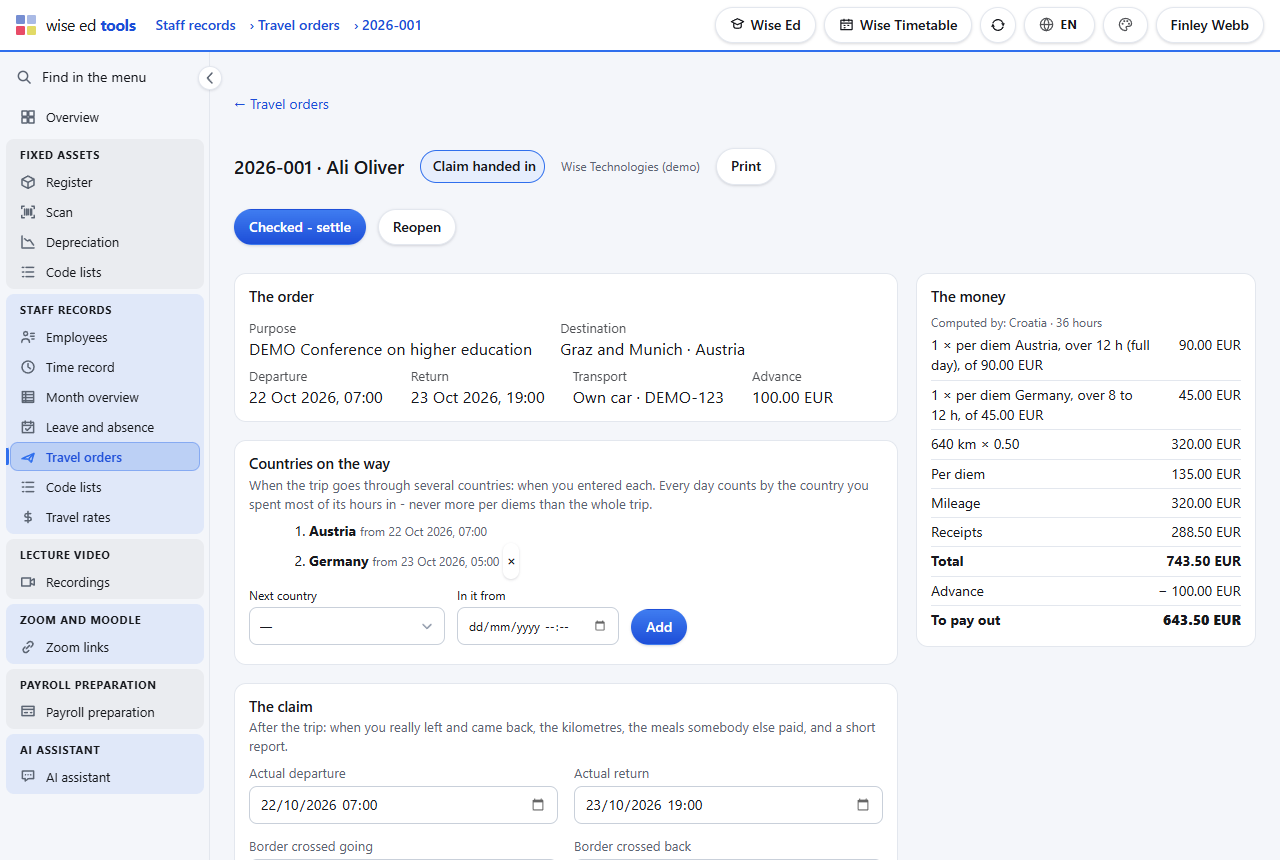
  • Several countries on one trip. The order lists the countries in turn and when the traveller entered each. Every 24 hours count by the country where most of them were spent, the later country when it is even — never more per diems than the whole trip gives.
  • Mileage at the rate per kilometre for a private car, and the receipts in their own currencies; a foreign currency is converted at the rate the order states.
  • Receipts with their scans. Each receipt row takes a PDF or a photo (JPG, PNG, WEBP, HEIC) up to 10 MB — on a phone the camera opens — and the boarding pass or invitation can be attached to the order itself. Scans open in the browser; the print counts them per receipt.
  • The print: the order, the countries, the claim with every receipt and the amounts, ready for signatures.
A travel order abroad in the office: the countries on the way, the per diems by country and the receipts with their scans
One trip abroad: countries in turn, per diems, receipts with their scans, and what is left to pay.

Rules that ask, not refuse

  • Kilometres far above the plan, the same receipt file twice: asked, and saved once confirmed.
  • Refused only what cannot be: a country entered outside the time abroad, countries on a trip at home, a file that is not a receipt or is too large.
  • Who sees what. The employee sees their own orders; the superior those of their own people; the office all of them. A cancelled order takes its days out of the staff record again.

Not yet

  • No electronic signature. The order prints for signing.
  • No payment from here. The amount to pay out goes to the payroll or accounting office.

Questions about travel orders

Our country’s rules are different. Can we change them?

Yes. The rules load with one button and every amount — per diem bands, country rates, meal reductions, the mileage rate — can be changed by the school.

Can the employee hand in receipts from the phone?

Yes. On the employee’s own page each receipt row takes a photo straight from the camera.

Does a trip show in the staff record?

Yes. When the order is approved its days are written as a business trip, and they follow the order if it is cancelled.

Works with

Each module works on its own. These are the ones it does more with.

Staff records

Time, leave and absence; employees on their own page, superiors approve, the month for payroll.

Wise Ed Tools

The school’s own running beside the student system, with one sign-in.

Finance

Price list, instalments, invoices with a payment QR code, payments and who owes what.

See Wise Ed on your own school

Book an online presentation. We will walk through how your student office works today and show you the same job in Wise Ed — with your programmes, not a demonstration dataset.