wiseed

Money and staff

Staff records

Who worked how long, who was on leave, ill or on a business trip, and how many leave days each person has left — for every employee, month by month. Employees clock in and out and ask for leave on their own page, their superior approves, and the office sees and corrects everything and hands the month to payroll as one file.
  • Employees sign in to their own page
  • Superiors approve their people’s leave
  • The month for payroll as a CSV file
  • Public holidays loaded per country

What it does

  • One card per employee: job, department, superior, kind of employment, dates, working hours for each day of the week and yearly leave days. The list starts as a copy of the timetable’s lecturers with one button; anybody else is added by hand.
  • The time record: one person’s month, a row per day with the planned hours (none on weekends and public holidays, which are named), and the spans of the day — kind, from–to, break, hours, note. Fill the month puts the planned hours on every empty working day. The month prints as a signed record.
  • Kinds of time are the school’s list: work, work from home, business trip, training, annual leave, special leave, sick leave, unpaid leave and time off in lieu to start with — each saying whether it counts as work, is paid, needs approval and uses leave days.
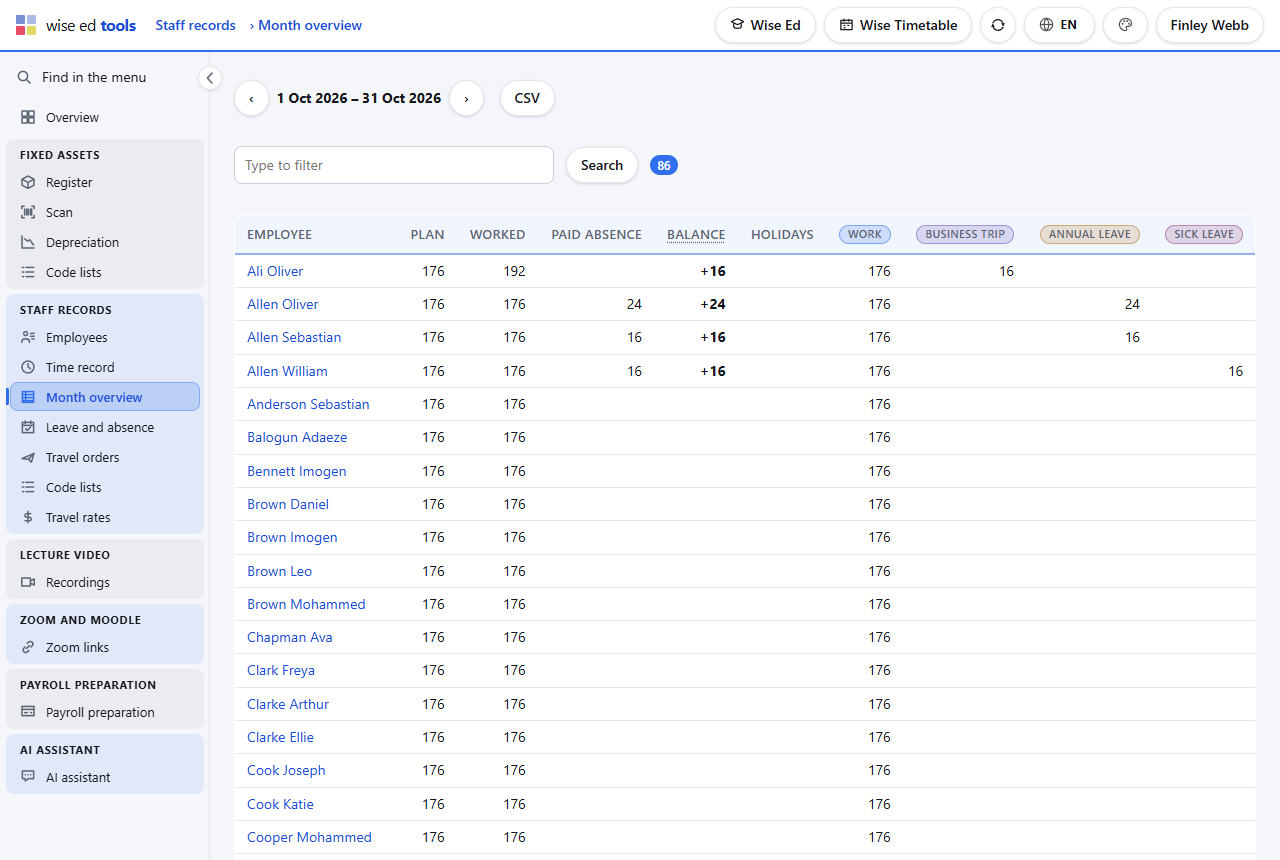
  • The month overview shows everybody’s planned and worked hours, paid absence, balance and hours per kind, filtered by department and searched by name; the whole month goes to payroll as a CSV file that a spreadsheet opens as it is.
  • Leave: requests by state, the office’s own entries approved at once, and each person’s yearly entitlement with the days carried over, used, waiting and left. An approved leave writes its days into the record; a cancelled one takes them out again.
  • Public holidays of the school’s country are loaded for a year with one button — five rule sets in the region so far, moving feasts computed — and the school adds its own days.
The month overview of staff records: planned and worked hours, paid absence and balance per employee, with the hours of each kind of time
The month for the whole school, with search, departments and the CSV for payroll.

The employee’s own page

Each employee the office gives a login signs in to a page of their own — on a phone too.

  • Clock in and out with one button. A day left open is asked about the next time, with the time to close it.
  • The own month: the same rows as the office’s record. Entries the employee made can be corrected from the first day of last month on; the office’s entries and approved leave are shown, not changed.
  • Ask for leave, see the balance, withdraw a request still waiting.
  • The superior’s tab: whoever the school has marked as an approver sees the requests of their own people and approves or rejects them, with a note. Approval writes the days into the record, as the office’s does.
  • Five wrong passwords lock the login for a quarter of an hour.

Rules that ask, not refuse

  • A day over twelve hours, overlapping spans, leave over the balance, leave with no working day in it: each is asked, and saved once the office confirms.
  • The office answers for the record. It sees and corrects every entry; the employee’s page cannot change what the office or an approval wrote.
  • Business trips come from the travel order. An approved order puts its days into the record by itself; they are changed on the order, not in the record.

Not yet

  • No clock terminal or card reader. Clocking in is a button on the employee’s page.
  • Payroll is not calculated here. The month goes out as a CSV file for the payroll office.

Questions about staff records

Do part-time and external lecturers belong here?

Whoever the school wants. The copy from the timetable brings every lecturer; the list shows the active ones, and anybody not employed is marked inactive or left out.

Can an employee change what the office wrote?

No. Employees change only their own entries, and only from the first day of last month on.

What does payroll receive?

One CSV file for the month: each employee’s planned and worked hours, paid absence, balance, public holidays and the hours of every kind of time.

Works with

Each module works on its own. These are the ones it does more with.

Travel orders

From request to payment: per diems by the country’s rules, several countries, receipts with scans.

Wise Ed Tools

The school’s own running beside the student system, with one sign-in.

Lecturers’ work

Each lecturer’s month taken from the timetable, checked, approved and paid.

Lecturers

Habilitation, profile and public list; absences and their cover, availability, my students.

See Wise Ed on your own school

Book an online presentation. We will walk through how your student office works today and show you the same job in Wise Ed — with your programmes, not a demonstration dataset.